Airtable
Enterprise Hub
tldr: I led several naming workstreams, created an account structure taxonomy, and and partnered with product design to think through navigation, terminology, and IA for an expanded version of the Airtable admin panel that enabled scaled administration at large organizations.
Problem: Some of our largest customers experienced challenges when trying to administer Airtable at scale. Our primary enterprise account structure was an “organization,” which represented a collection of users and workspaces (groups of Airtable databases) associated with a set of email domains, but it wasn’t robust enough for some of our largest customers. Large enterprise customers would either create several organizations so line-of-business owners could have the right level of visibility into how their users were working in Airtable (which was a pain to manage) or they’d consolidate everything into one organization, which meant that some admins had too much visibility and control in places that they didn’t need it. 👀
Solution: We developed a feature called Enterprise Hub modeled after Slack’s Enterprise Grid. Its goal was to enable more scalable administration and create central visibility for our largest enterprise customers. By introducing new account structures and creating multiple levels of administrative control, we could give centralized IT teams the ability to delegate certain administrative responsibilities to the line-of-business owners who have the most context. We also could make it possible for them to standardize their organization’s settings and enforce uniform security policies.
My role: I drove the naming process E2E for the feature through competitive audits, leadership reviews, and many (many) namestorms. I also named the new account structure we introduced (organizational units) and created a taxonomy to help internal teams understand how our different enterprise account structures and concepts all connected together. Then, I partnered closely with product design to design an expanded version of our admin panel for IT super admins, which included proposing a new navigation paradigm, figuring out a way to communicate how settings inheritance works, and refreshing every corner of of our admin panel—no tooltip left behind.
Key partners: Product design, engineering, product management, product marketing
What I learned: Working on such a high-complexity feature means that you’ll need to consistently revisit previous design decisions as you gain new information, whether that’s eng feedback on scope, customer feedback, or just something you realized you didn’t fully understand before. Impermanence and iteration is just part of the work. Also, product naming for a feature like this is so tricky—my stakeholder management skills came in handy here.
Designs
Product naming
Before I joined this project, internally the team had been referring to the feature as “Enterprise Grid,” as we were modeling it after Slack’s offering. However, talking about it was becoming confusing because the team had been using the term “grid” to refer to both the new account structure we were introducing and the overall feature name. For example, it was common to hear something like “With Enterprise Grid, you’ll be able to have a grid that contains multiple organizations” in team discussions. I felt strongly that this was confusing, in part because “grid” is not an intuitive term with a clear and conversational meaning.
To help the team reach clarity, I first initiated a naming workstream to identify what we should call the new account structure we were introducing. I assembled a thorough competitive audit, led namestorms with stakeholders across product / sales / marketing, ran an asynchronous UserZoom study to validate some of our ideas, and presented my proposal to senior product leadership in a review. Ultimately, we landed on the account structure proposal below, which preserved 2 out of the 3 of our existing account structure terms while aligning with competitors.
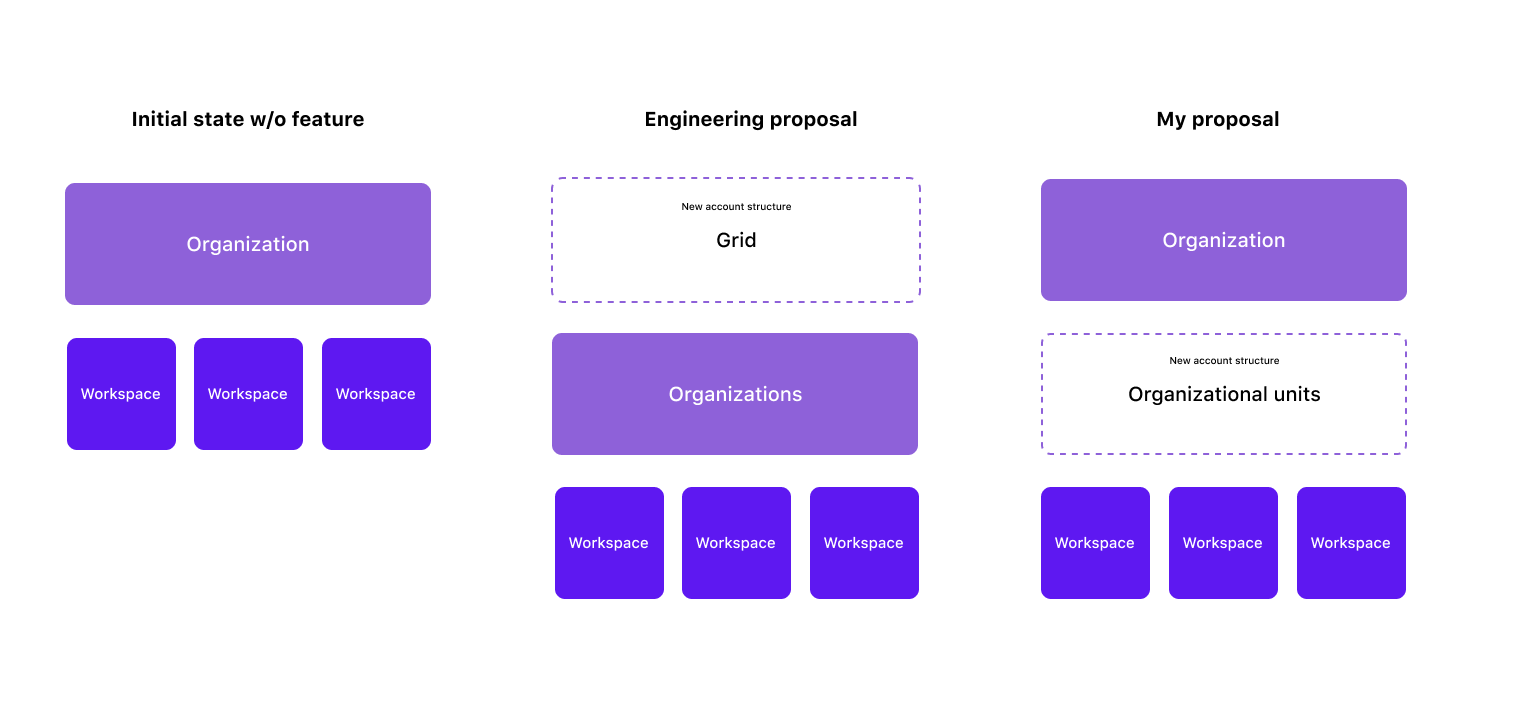
Most competitors used the term “workspace” as the second layer of the account structure, but it would’ve been too much change management for us to mirror that because of the existing meaning that “workspace” had in Airtable (it’s the primary billing unit for self-serve paid plans). I also pushed to keep “organization” as the top layer account structure so it wouldn't have a plan-dependent definition—customers would “unlock” an additional account structure that sat below an “organization” instead of having the definition of “organization” change.
After aligning on the account structure terms, I drove a second naming workstream to name the feature overall. This would allow Marketing and Sales to more easily talk about it with customers. I conducted another comprehensive competitive audit, pre-aligned with important senior stakeholders, and set up several namestorms to iterate and land on a feature name that felt representative. We landed on “Enterprise Hub,” which highlights the centralization that the feature unlocks for IT teams.
Expanded admin panel
Once we aligned on the feature name and account structure terms, we were able to start envisioning how we’d need to update our Airtable admin surfaces to support the new account structure and tiered admin roles. Based on conversations with key customers, we expected that “super admins” would be folks from central IT who needed visibility across the entire organization. Org unit admins, on the other hand, would likely be department leads who only need to manage users and data from a specific part of the business.
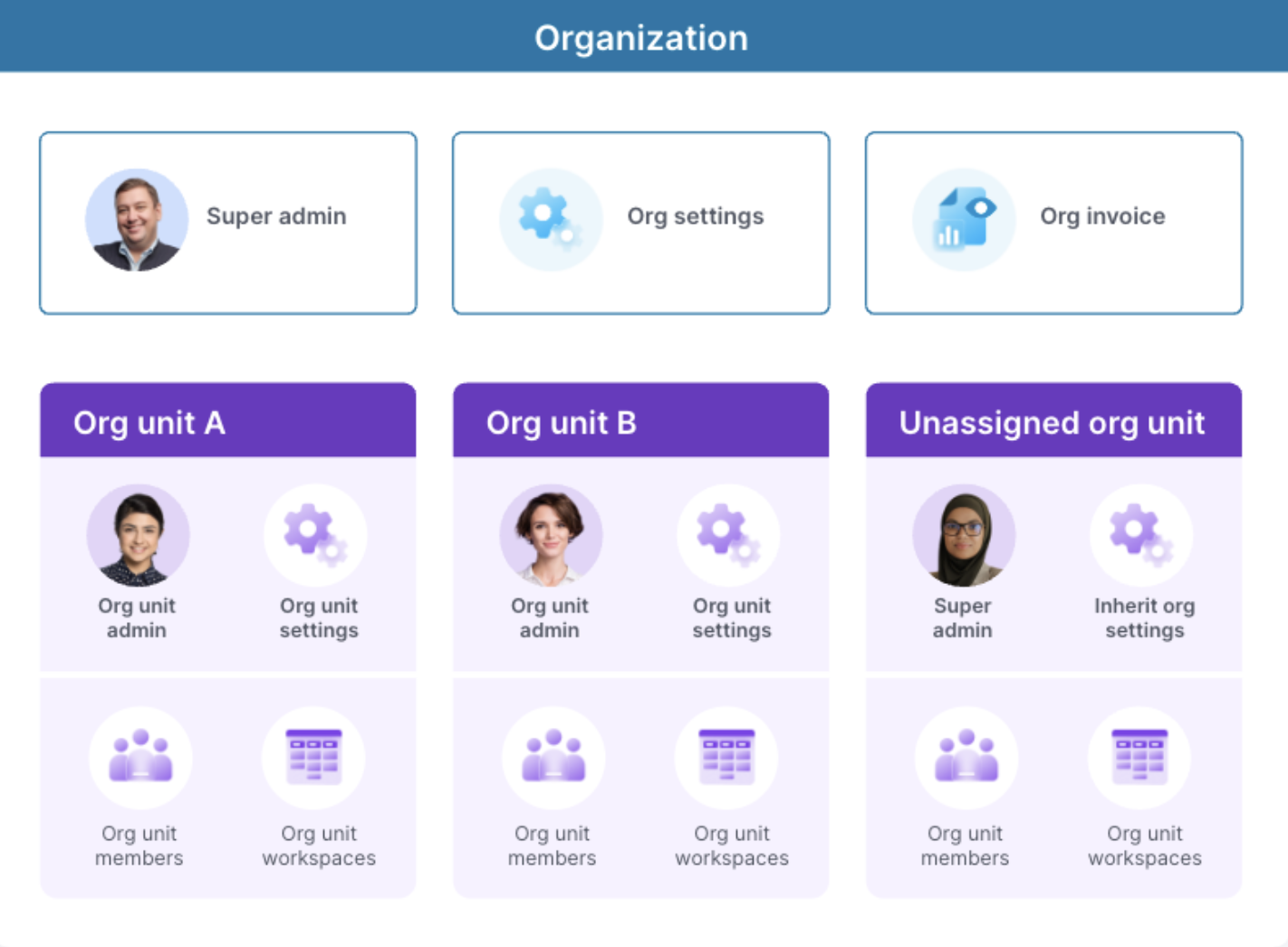
To support this major change to our account structure model, we needed to design a new version of the admin panel for this new super admin role that would give them centralized visibility across all their organizational units. We revamped the navigation, added a new overall “organization” page that displayed all org units, and supported several changes to our existing pages that helped them make sense for super admins.
Key content considerations:
The information we displayed on any given page was contextual depending on the scope (organization vs. org unit) that the super admin had selected in the left nav. I aimed to consistently reinforce that scope in tooltip copy and other helper text.
The “unassigned org unit” is intended to be a holding ground for users and workspaces that hadn’t been assigned to an org unit yet. I proposed and tested that term in an asynchronous UserZoom study with IT admins, and it tested well in terms of comprehension.
Defining the actions that super admins could take on users was tricky, especially since there was legacy code that created some tricky nuances with our existing actions. I advocated for clarifying the consequences of user administration actions in confirmation dialogs.
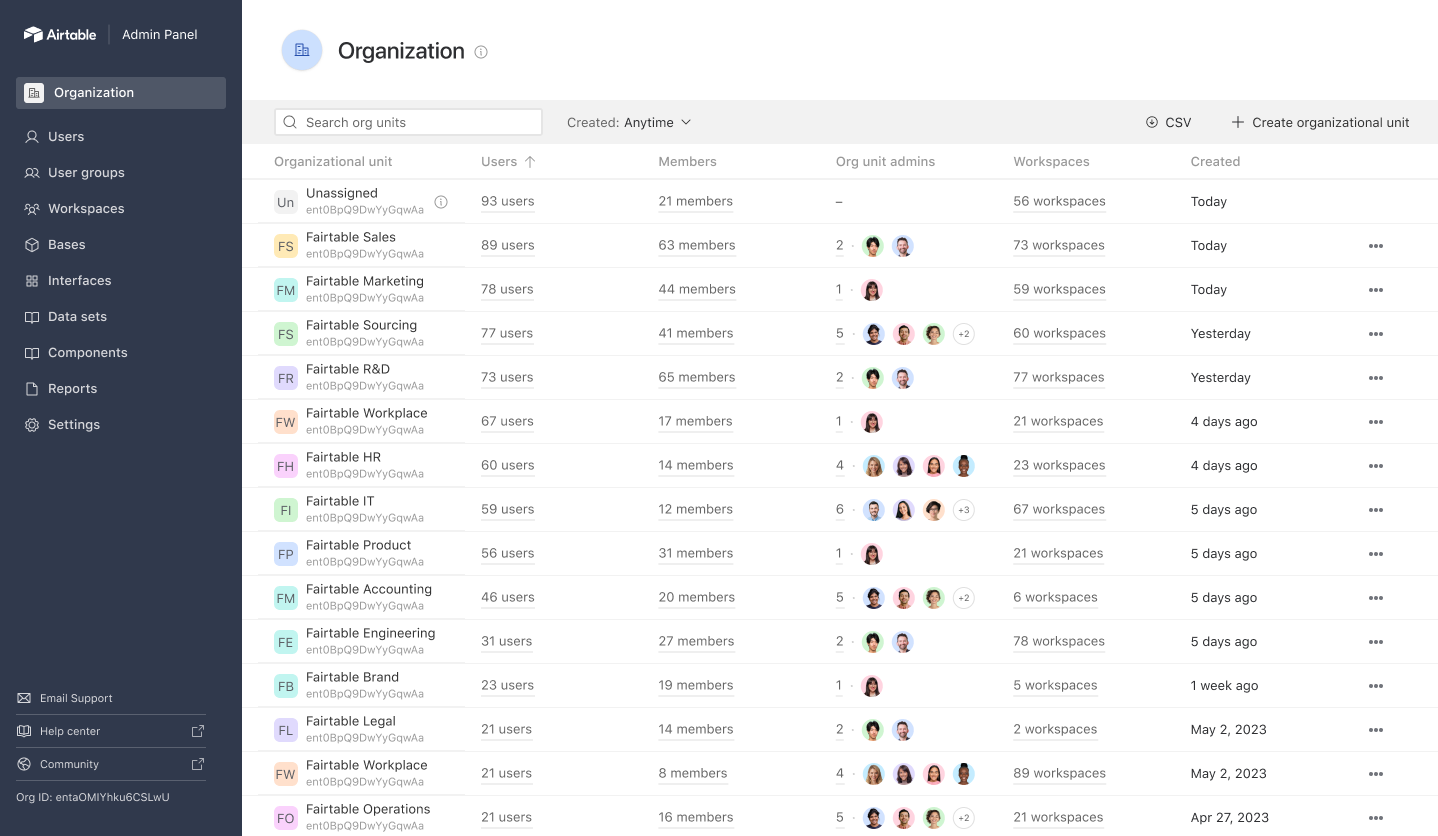
Organization page: Net-new page that we added just for super admins. I worked with product design to hypothesize about what org unit metadata would be important to show here. We had plans to test this post-launch.
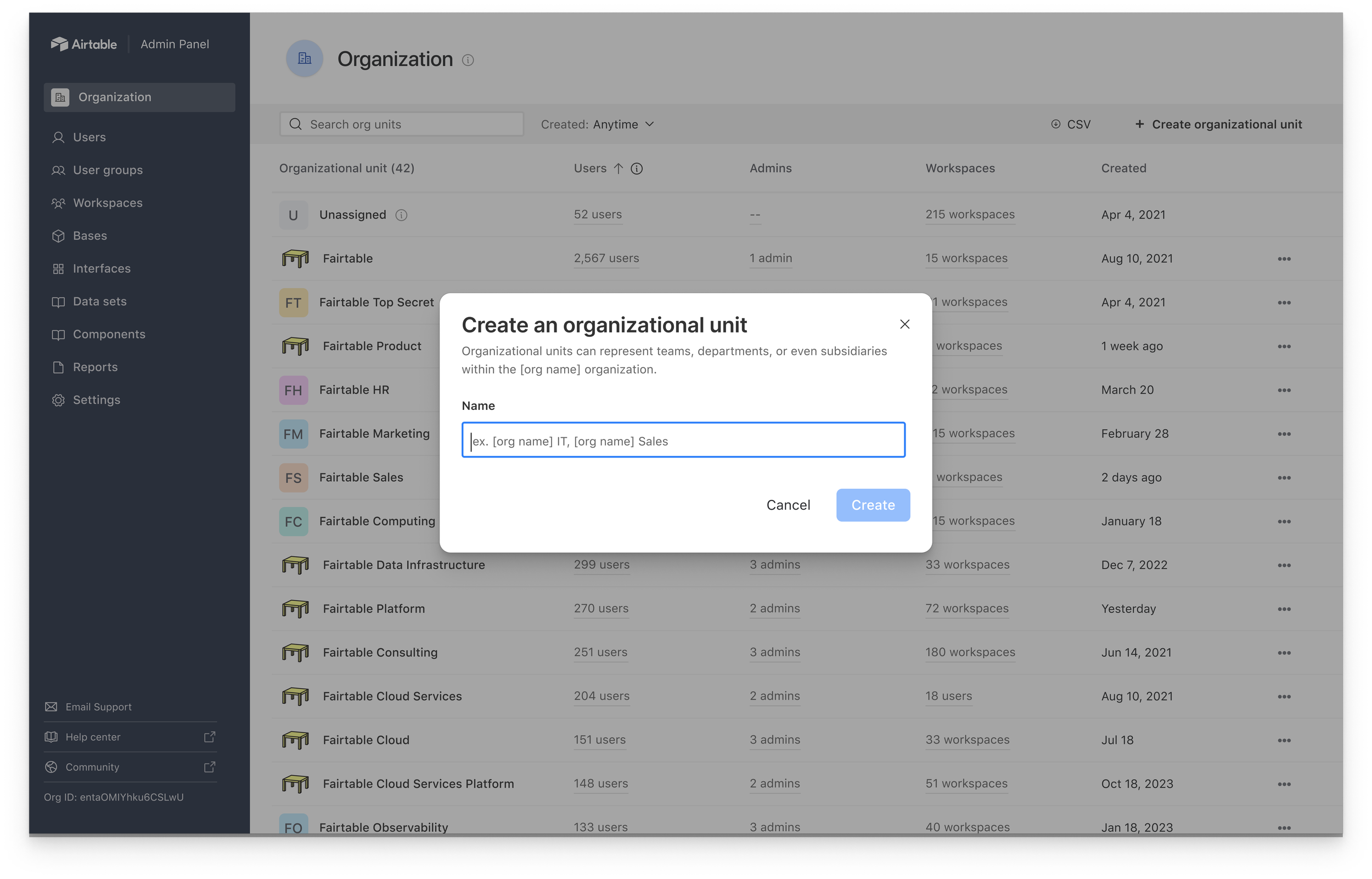
Create org unit dialog: Customers were going to be using org units to represent a variety of sub-groups within their organizations, so I tried to reflect that in this subheader copy.
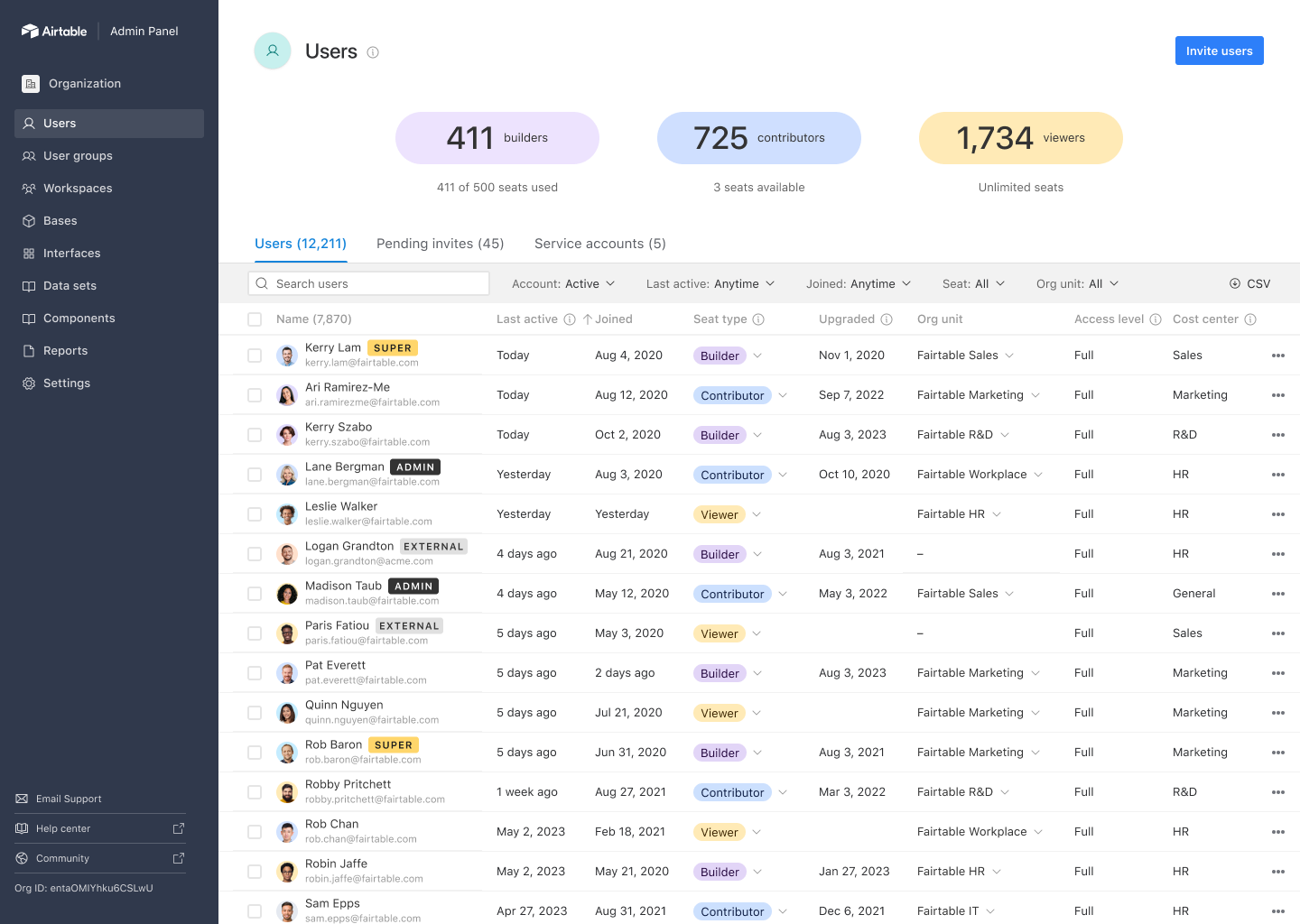
Users page from super admin POV: This is the page where a super admin can see all users in the organization. Because license management is a common workflow for Airtable admins, we preserved the large license counts at the top of the page. We also opted to use inline badges to represent special user types, like admins and users who were external to the organization.
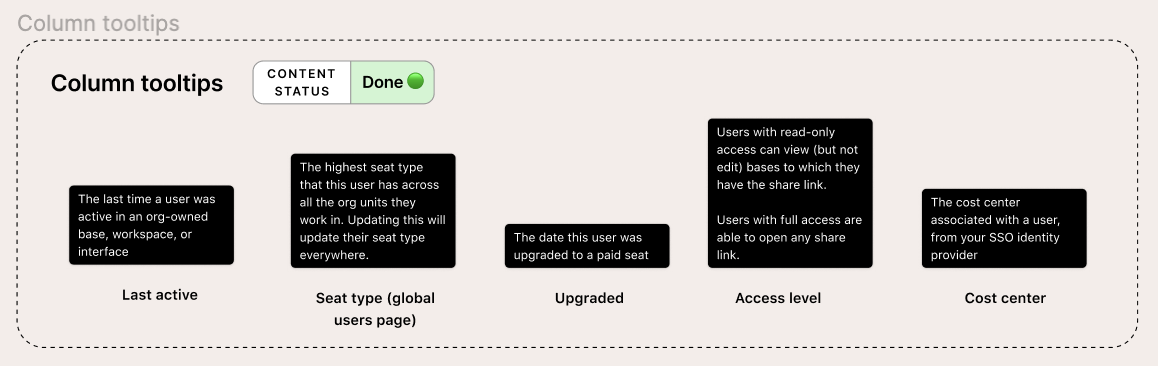
Users page column tooltips: The information that we displayed in the various columns on the Users page was aggregated across all org units, so I aimed to clarify that in these tooltips. This was probably most important in the seat type tooltip, as updating a user's seat type on this page would update it across all org units.
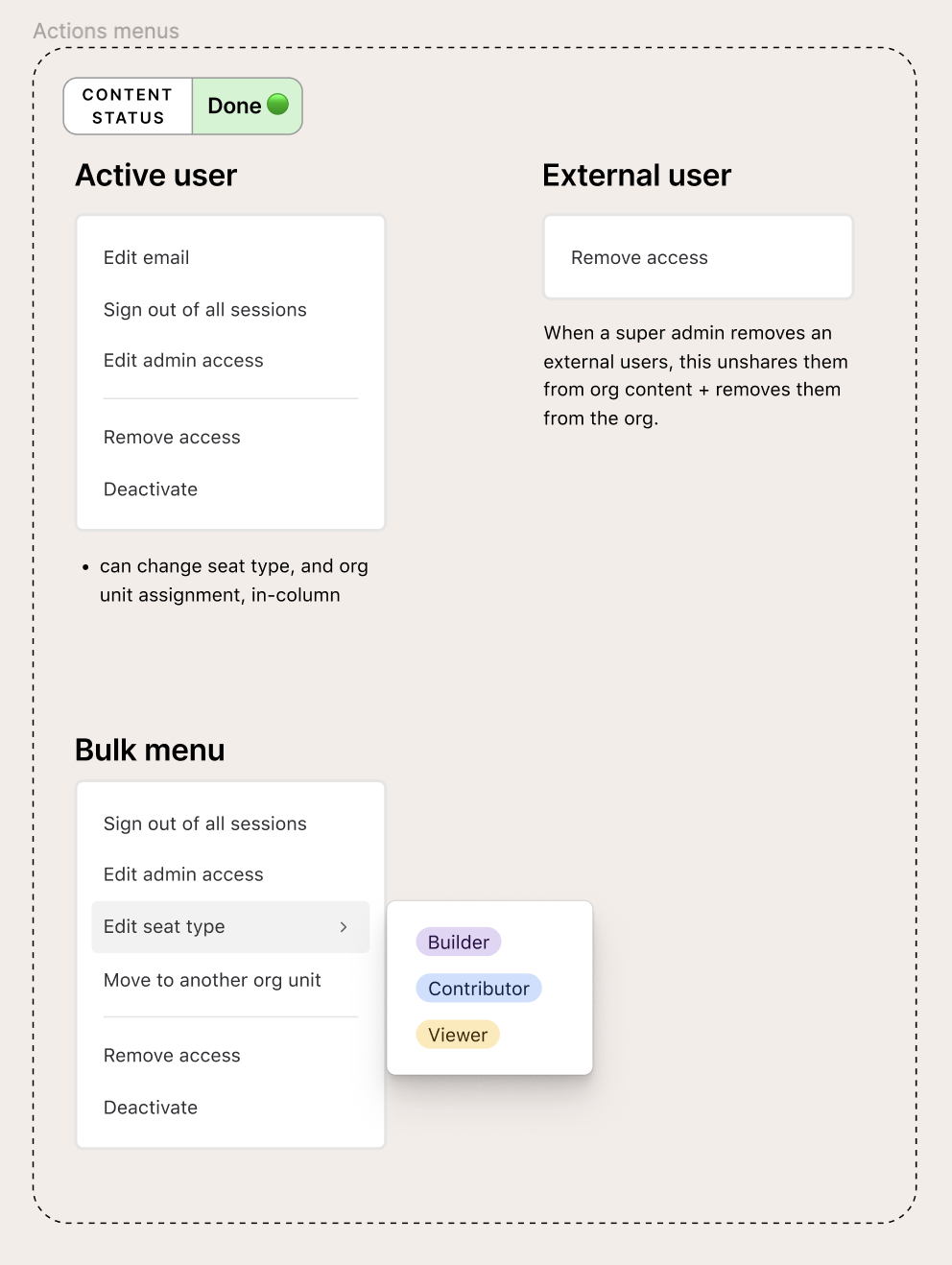
User administration actions: Defining the actions a super admin could take on different types of users was actually quite tricky. Remove access and deactivate, for example, are two similar but distinct actions—"remove access" unshares the user from all org-owned resources, whereas "deactivate" keeps them shared on org-owned content, but locks them out of their account.
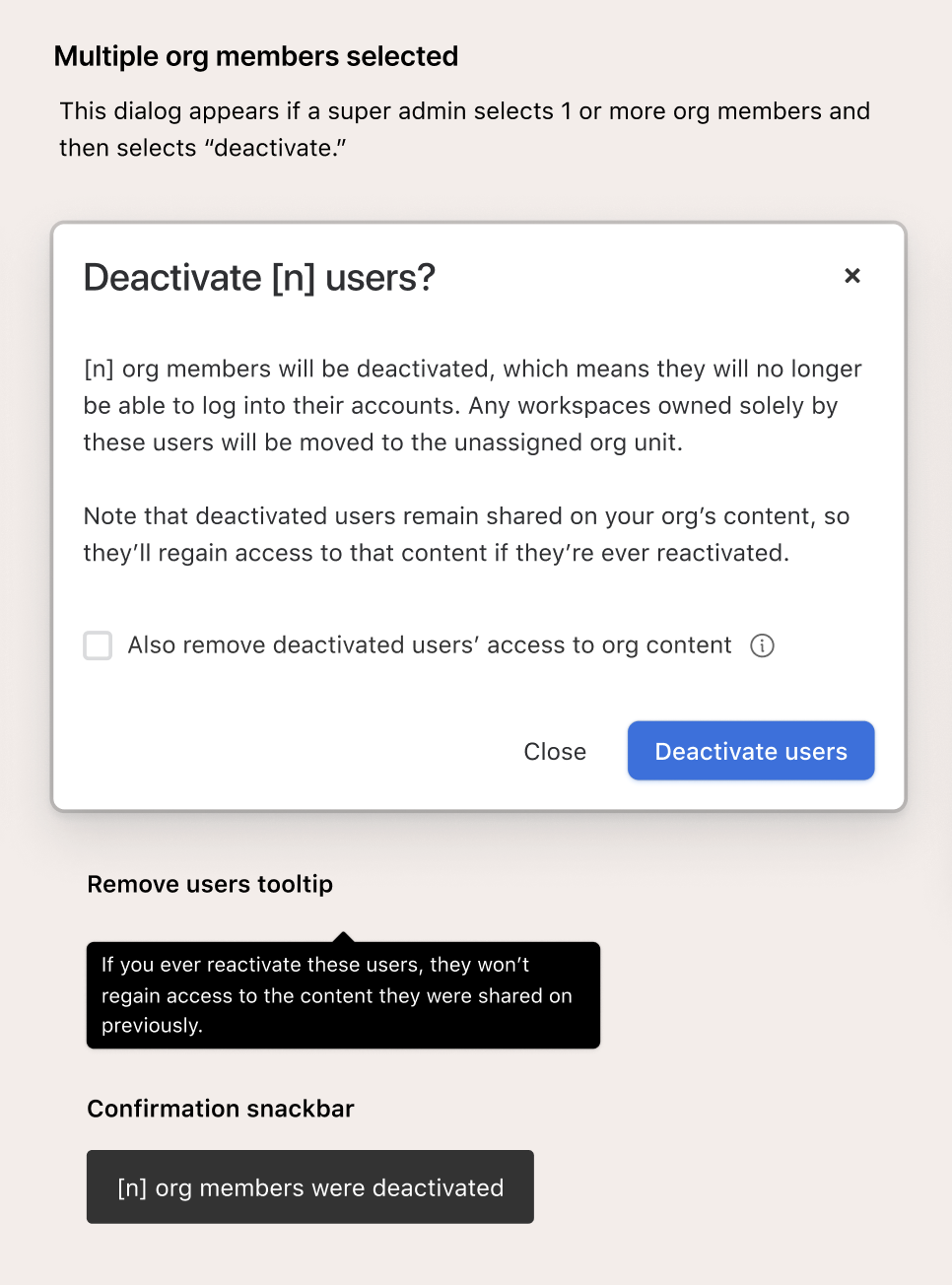
User action confirmation dialogs: Because we had so many user administration actions and some of them sounded similar, it was important to spell out explicitly in confirmation dialogs what it meant to take a particular action. This deactivation dialog was one of the more complex ones, as I pushed for us to give super admins the option (via a checkbox) to remove deactivated users' access to org-owned content.
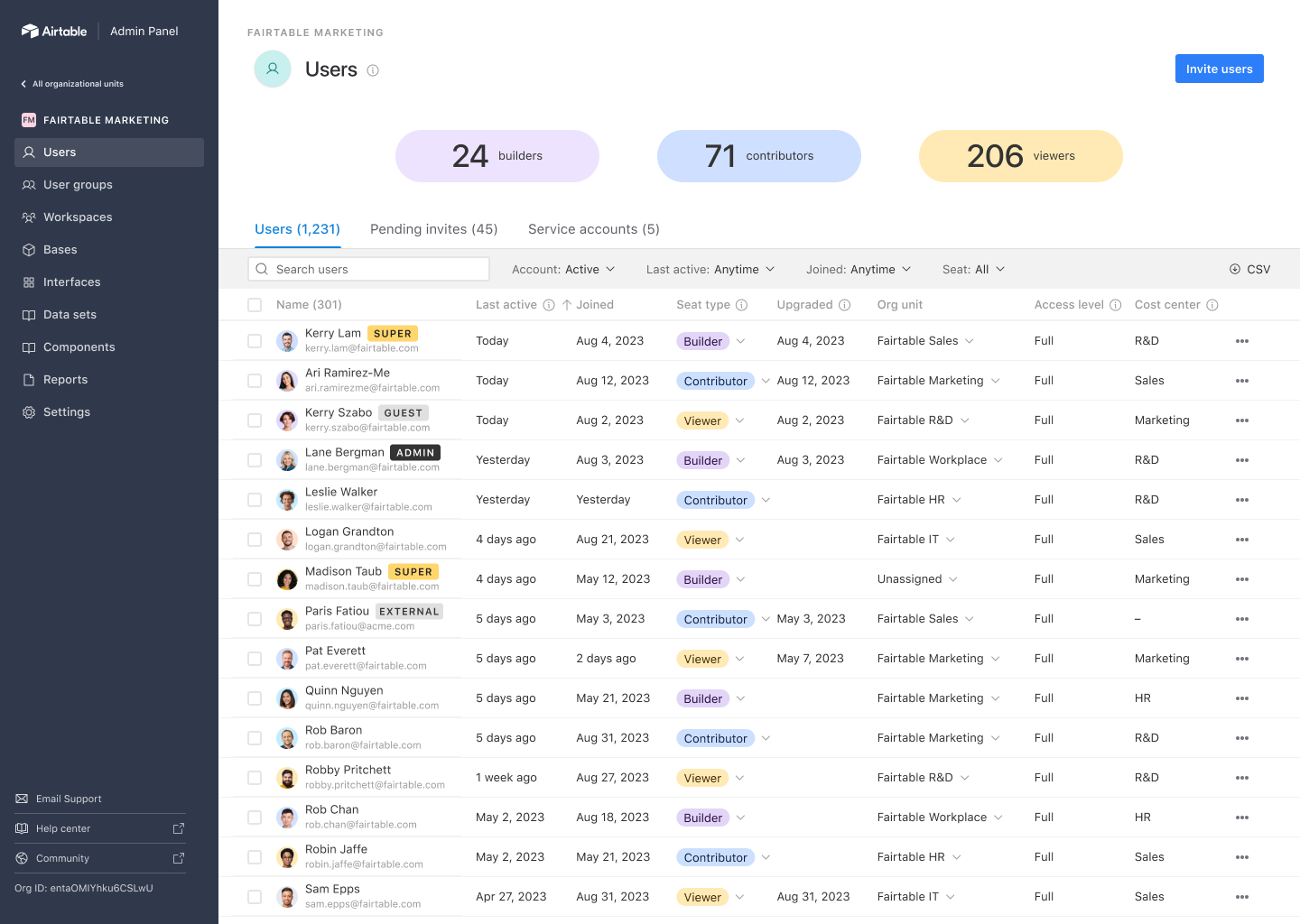
Users page for a specific org unit: If a super admin selected a particular org unit, we'd reflect that selection in the left nav. This selection applied to all pages in the left nav. In partnership with product design, I iterated through several different options for this navigation paradigm but ultimately landed on this one, which was the most simple.
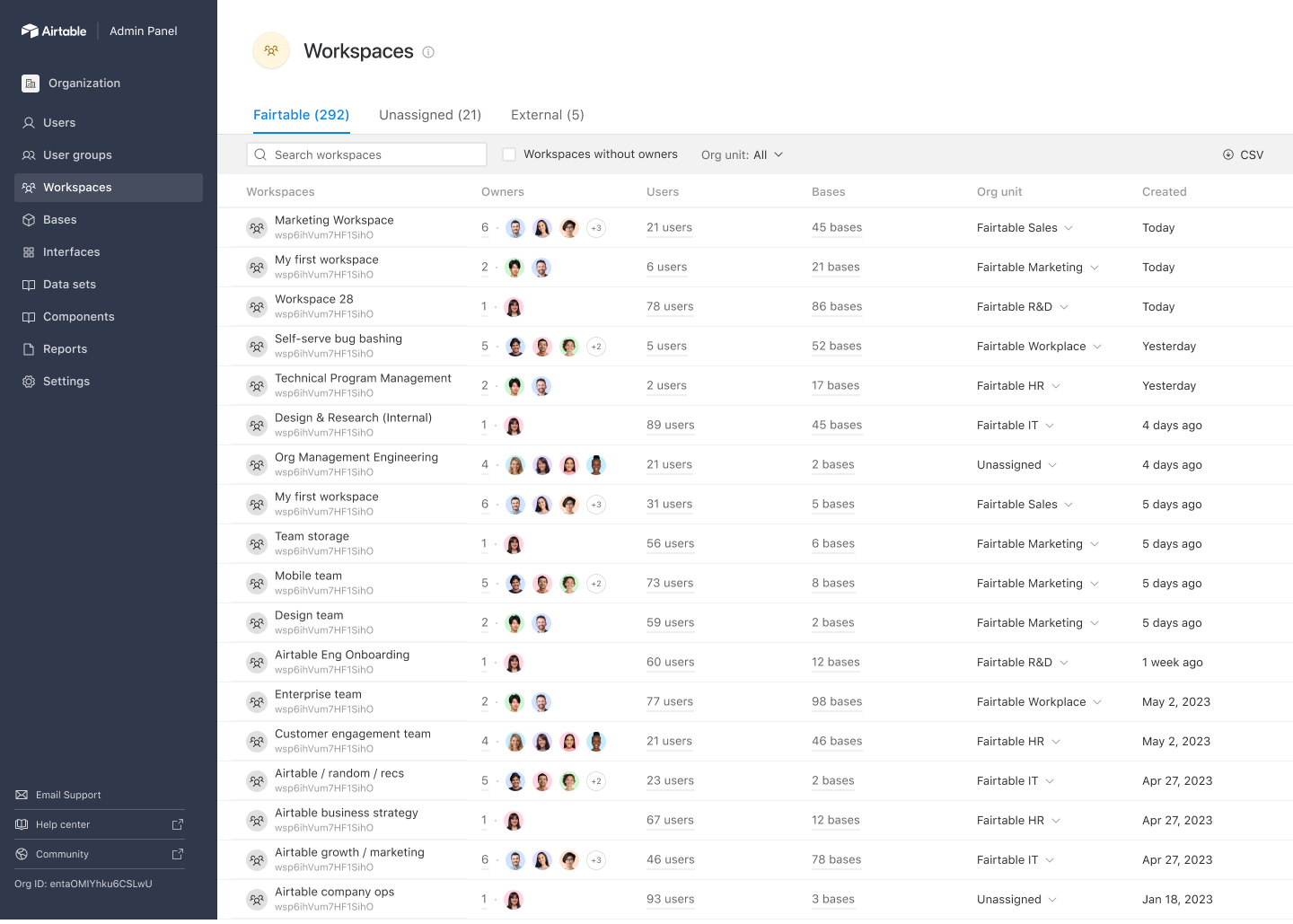
Workspaces page from super admin POV: I pushed for grouping out workspaces on this page based on the actions a super admin might want to take on them. For workspaces that already that belong to the org and are assigned to an org unit, there's no action. For workspaces in the unassigned org unit, super admins needed to go assign them to the correct org unit. And then for workspaces that belonged to org members but were external to the organization, super admins may want to upgrade them to our enterprise plan to be able to manage them.
Settings redesign
To support Enterprise Hub, the most involved changes were needed on our admin panel settings page. Previously, the page was fairly simple—it displayed the settings for the organization, controls, and the settings’ status. However, with Hub we now had settings that were global (meaning they applied across all org units and org unit admins couldn’t change them) and settings that could have inherited defaults for org units, but that org unit admins could change if they wanted to. tldr: We had to figure out how to show settings inheritance and allow super admins to view and configure inherited settings centrally.
After some initial exploration, my product design partner and I identified that it wouldn’t be feasible to display all the inherited settings for all org units on one consolidated page, so we proposed what we called a “settings detail page” that communicated the default state of the setting, and then the actual state of how it was being inherited across org units in an easy-to-scan table. We received positive feedback from IT admins in a UserZoom study that the ability to see and centrally configure settings in the table was very useful to them. However, we unfortunately ended up needing to descope the full table to accommodate eng timelines, so I included both our initial proposal and the descoped version below.
While redesigning the architecture of our settings pages, I also took initiative to re-do the IA of the settings tabs and completely refresh the content across all of our settings, as there was inconsistent terminology galore and it sounded like it had been worked on by 10 different teams (because it had been 🙂). I also spun up a process to identify and request reviews from SMEs on each setting to ensure my proposed updates were accurate. All in all, there were over 20 different admin panel settings, so this was no small feat! It required me to be detail-oriented, thorough, and eager to learn about the nuances of each setting, which often meant learning about areas of the product that were totally new to me.
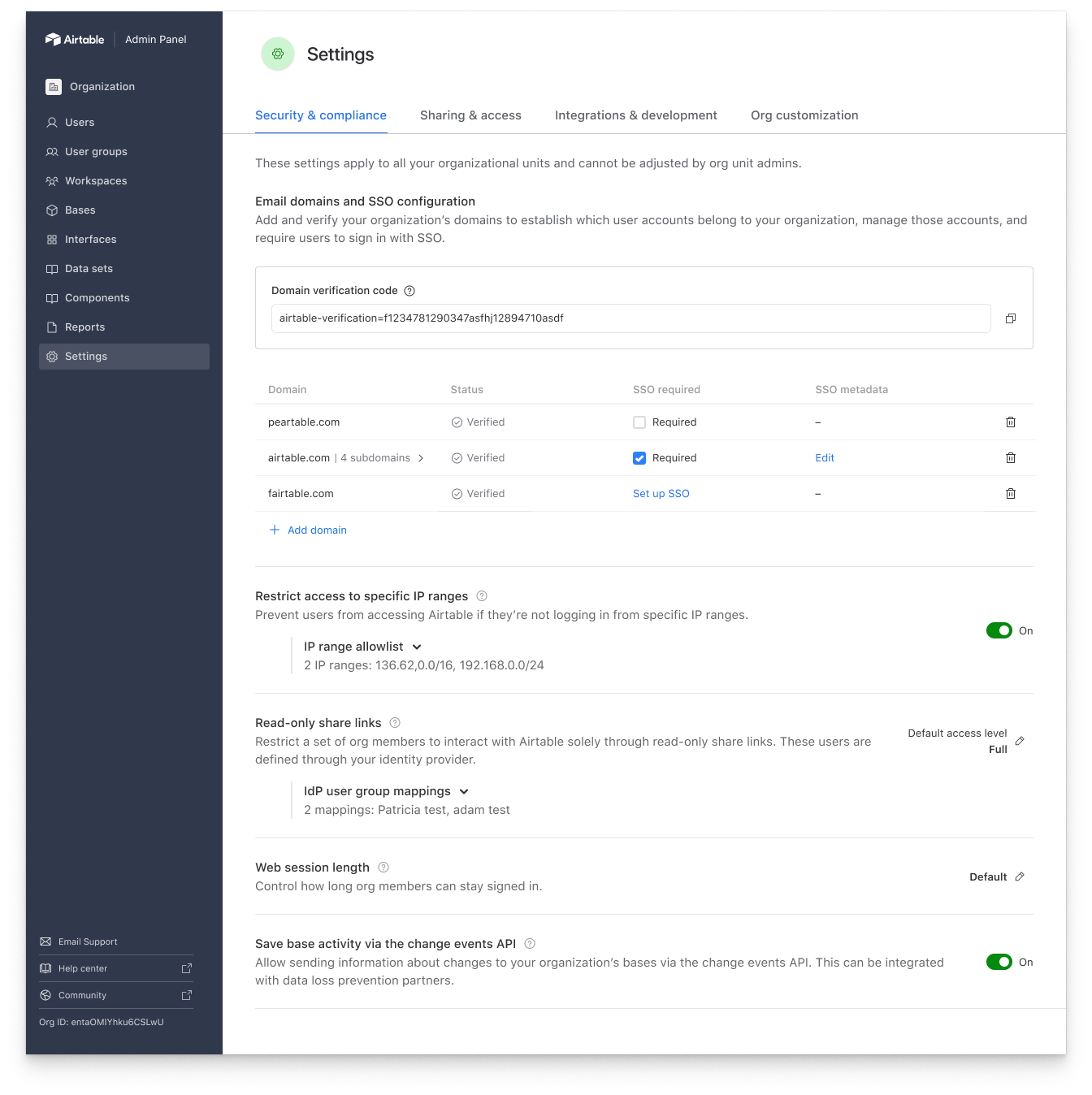
Global settings: These settings apply across all org units. Because the settings on this page don't need inheritance controls, super admins can configure them directly here (instead of needing to click into a detail page). I suggested adding a subheader at the top that explains why this page works differently than the others.
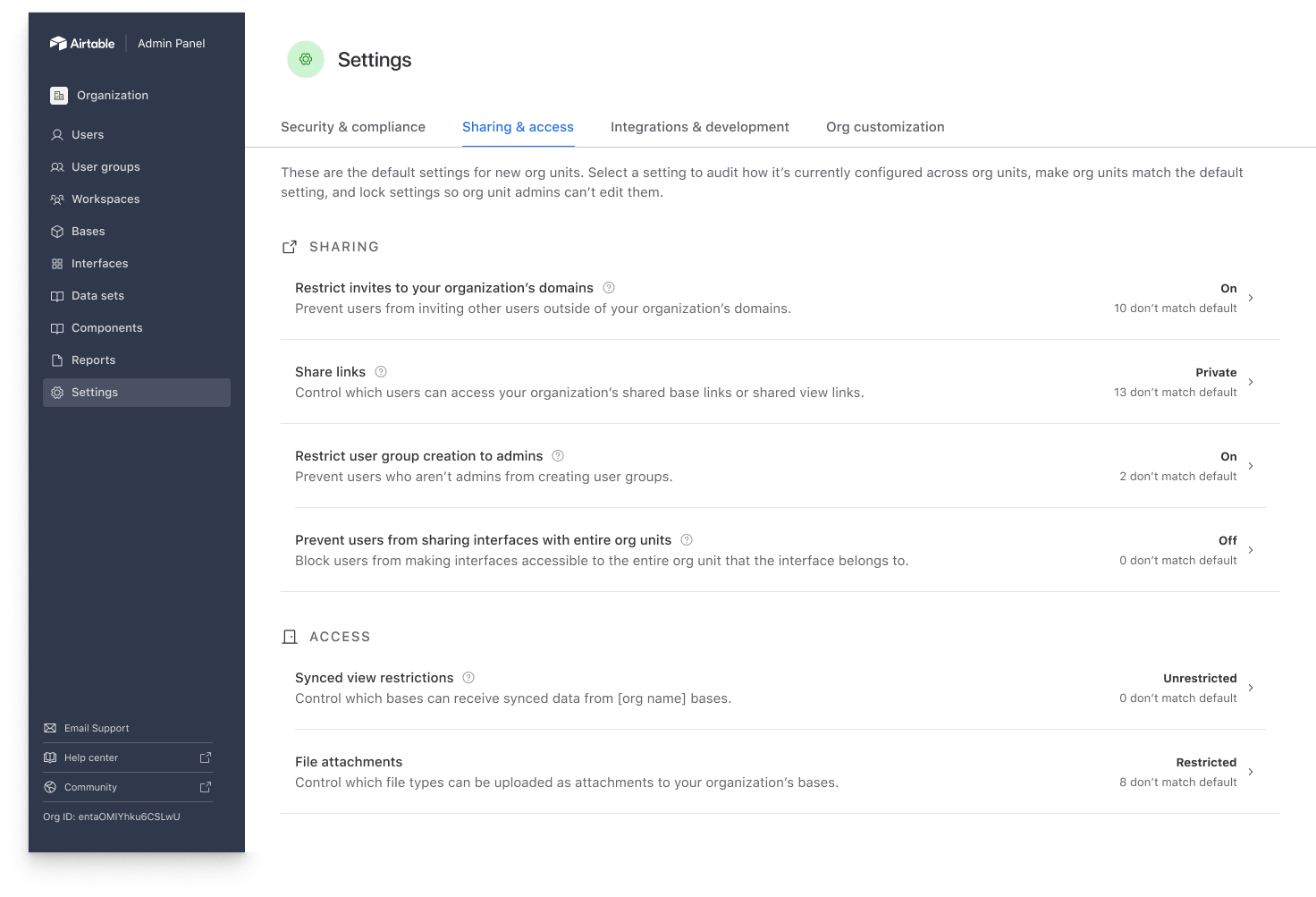
Settings with inheritance controls: If these settings are unlocked, org unit admins can change them. We surface on this page how the setting is configured and how many org units don't match the default setting that the super admin chose. This allows them to quickly audit at a glance if there are sensitive settings where org unit admins are disregarding the default—settings that might need to be locked down. I experimented with other strings, but ultimately landed on "don't match default" as the most clear. Terms like "exceptions" created confusion when we tested them with IT admins.
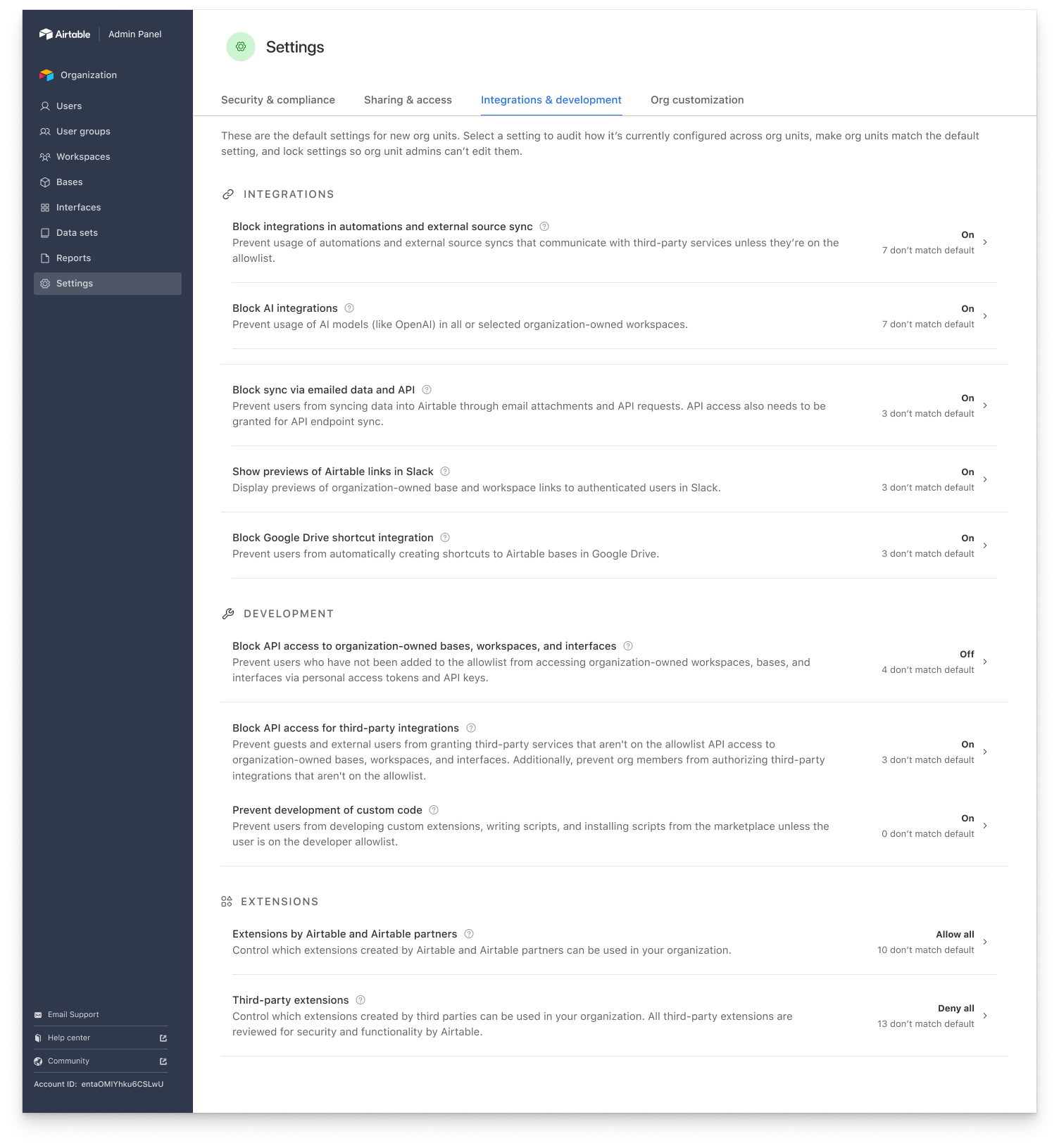
Settings with inheritance controls: Follows the same structure as the previous screen, although these settings are in general more technical and developer-oriented. I completely re-did the settings IA to more logically group related settings together, which ended up changing the structure of this page a fair amount.
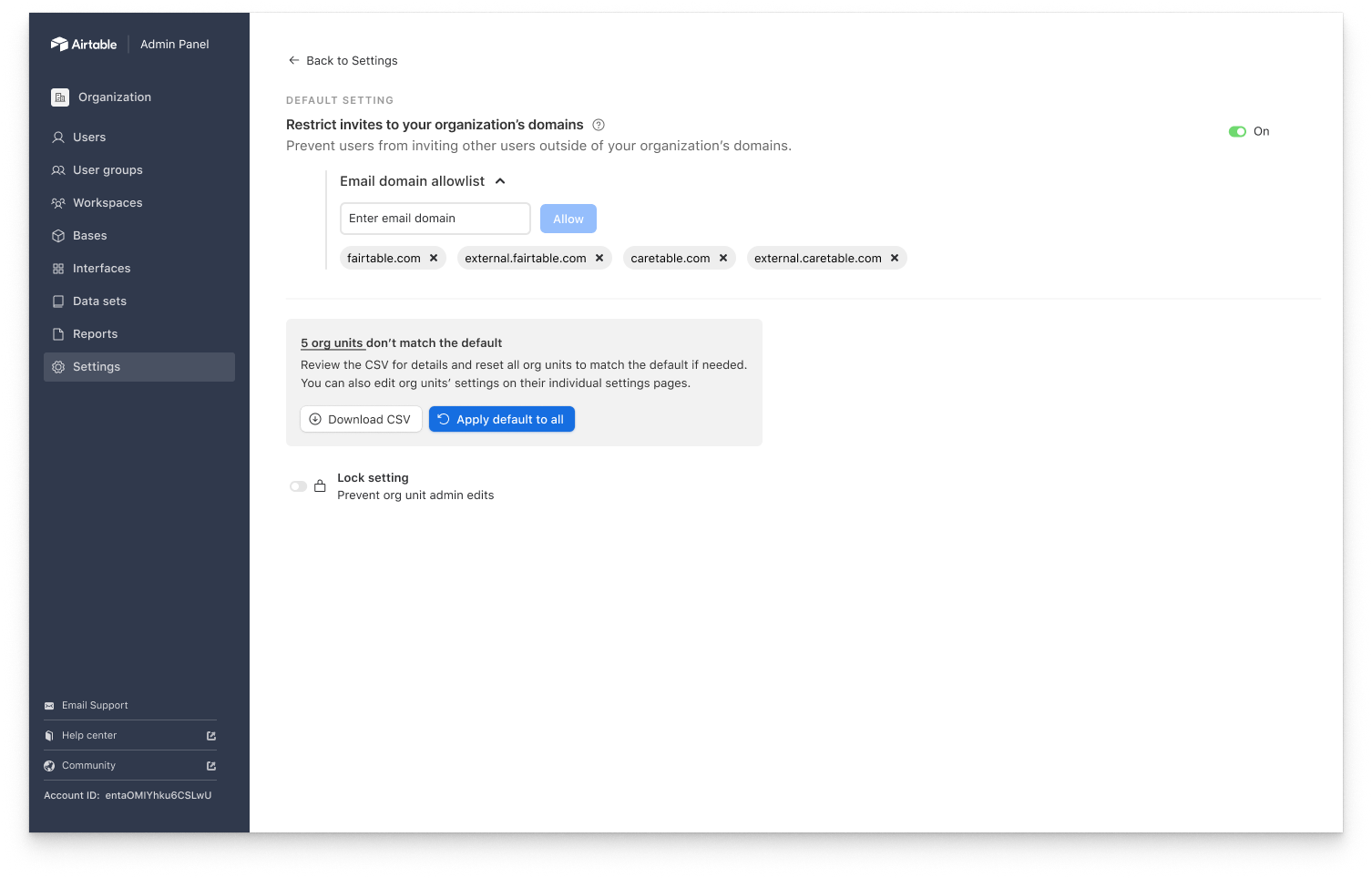
Descoped settings detail page: This setting has a simple on/off control, so it's written as an imperative verb statement. When the setting is on, the statement is true. I propagated this structure across other settings that used boolean controls. Additionally, since we couldn't add the full table listing out the different org units, we compromised with engineering to offer admins a CSV download that would show them how the setting was configured across org units.
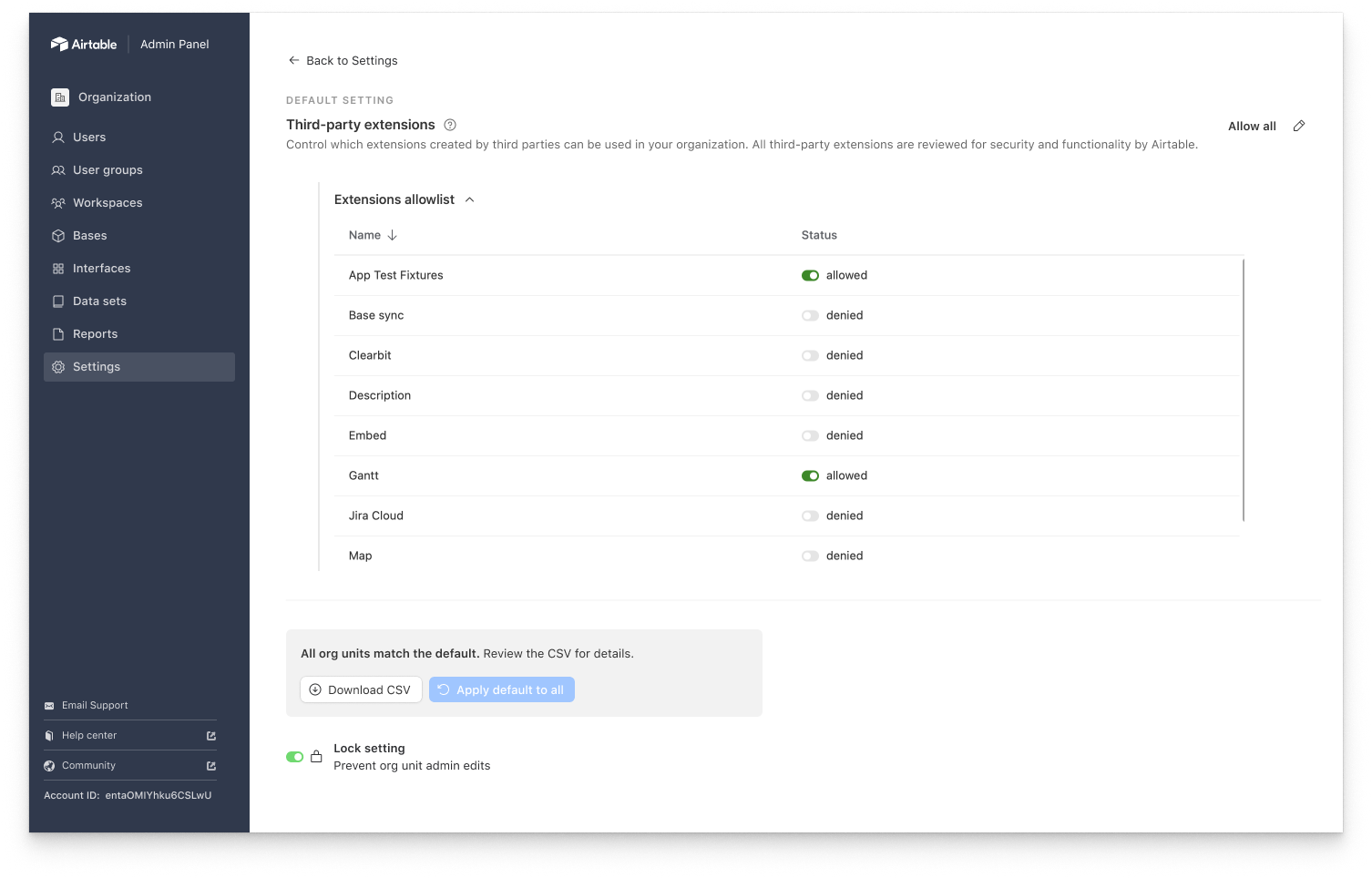
Descoped settings detail page: This setting doesn't have a boolean control—it has 3 different configuration options—so it's written as a simple noun. I propagated this pattern across settings with a similar set of configuration options.
Key content considerations:
Inheritance control terminology: One of the settings we offered for super admins was the ability to “lock down” a particular setting so org unit admins couldn’t edit it for their respective org units. I had heard IT admins use the verb “lock” when talking about settings in various customer calls, so I tested it in a UserZoom study and ultimately used it in our final designs, despite some pushback from internal stakeholders.
Establishing content patterns: Enterprise Hub overall led me to develop stronger content patterns in the admin panel, and settings was one of the places where this showed up more clearly. I aimed to use the same set of verbs and parallel sentence structures across settings that behaved similarly.
Platform team processes: Working on settings for Hub made me realize that my team was a platform team, as several other teams were touching the admin panel and needing to add settings to support their projects, but they were doing so with no design guidance, which is what resulted in settings looking and sounding so inconsistent before. To avoid perpetuating this, I created documentation for other designers to help them write settings product copy and instituted a process using an intake form and Airtable automations that would allow them to request input from me and my product design partner. The goal was to help ensure that we didn’t continue to accumulate design debt in settings.
Outcomes
*Note that I don’t have a lot of specific metrics from this launch, as we started to roll it out to customers late Aug 2023 and I was laid off mid-Sept 2023.
Received positive feedback from key beta customers
We only onboarded 6 beta customers onto Hub before I departed from Airtable, but several of them were able to migrate onto the feature and set it up with no major UX issues.
Scrubbed risky terminology from the product
Aligning our account structure terms upfront meant that I could help ensure that the way we were talking about our account structures throughout the super admin panel was clear and accurate.
Made admin panel more cohesive
During this project, I articulated admin panel content standards and patterns that helped unify the different admin panel pages and make the content across them more specific and clear.